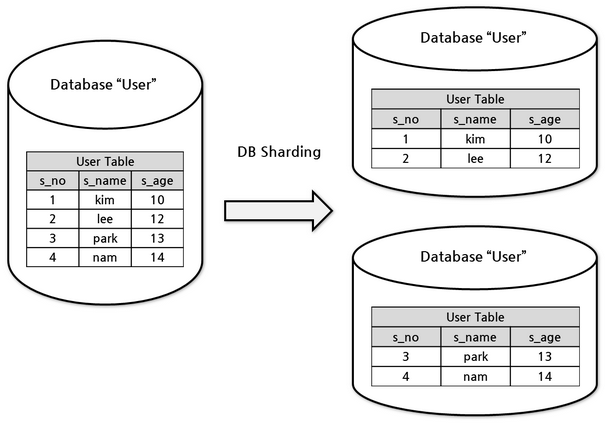
샤딩에 대한 처리를 직접 구현하고 싶다면 AbstractRoutingDataSource 를 Bean 으로 등록하여 DataSource 를 선택하는 부분을 구현하면 된다.
여러개의 DataSource 와 DataSource Key 를 함께 Map<Object, Object> 형태로 구성하고, 매번 DB 접근하기 전에 DataSource Key 를 사용해 AbstractRoutingDataSource 에 DataSource 를 질의하는 방식이다.
DataSource Key 매핑
먼저 DB 의 key 값으로 사용할 문자열 혹은 enum 을 정의한다.
1
2
3
publicenumDemoDatabase { demo_ds_0, demo_ds_1, }
그리고 각 DataSource Key 를 매핑시킨 Map<Object, Object> 구성.
AbstractRoutingDataSource 의 구현체인 DemoDataSourceRouter 에다 위에서 생성했던 Key - DataSource 매핑객체인 Map<Object, Object> 를 삽입하고, DataSource 가 라우팅되지 않았을 때 사용할 default DataSource 도 지정한다.
// 샤딩을 위해 id 값이 홀수/짝수 인지에 따라 DataSource 변경 publicstaticvoidsetById(long id) { intidx= (int) (id % 2); DemoDatabasedemoDatabase= DemoDatabase.values()[idx]; CONTEXT.set(demoDatabase); } // 외부에서 직접 DataSource 키값을 설정 publicstaticvoidset(DemoDatabase demoDatabase) { Assert.notNull(demoDatabase, "clientDatabase cannot be null"); CONTEXT.set(demoDatabase); }
ThreadLocal 에서 DataSource Key 값을 설정했다면 아래 AbstractRoutingDataSource 의 상속 클래스를 정의해서 해당 실행중인 스레드에서 설정된 DataSource Key 값을 반환할 수 있도록 처리한다.
JPA 와 AbstractRoutingDataSource 를 같이 사용할 경우 JpaTransactionManager 의 호환 문제로 인해 추가 설정 없이 read replica 분리는 어려울 수 있다.
DataSource 를 가져오는 과정은 @Transaction 으로 인한 AOP 로 인하여 정의 함수 실행 전 인터셉터되어 수행된다. 아래는 AOP로 수행되는 JpaTransactionManager 의 doBegin 함수인데 Datasource 를 가져오는 beginTransaction 코드가 먼저 실행되고,
// Delegate to JpaDialect for actual transaction begin. inttimeoutToUse= determineTimeout(definition); // 여기서 Datasource 를 가져옴 ObjecttransactionData= getJpaDialect().beginTransaction(em, newJpaTransactionDefinition(definition, timeoutToUse, txObject.isNewEntityManagerHolder())); txObject.setTransactionData(transactionData); ... }
Datasource 를 가져오고 난 뒤 한참 뒤에 SQL 문을 실행하기 직전 prepareSynchronization 를 통해 readOnly 를 true 로 변경한다.
1
2
3
4
5
6
7
8
9
10
11
12
privatevoidprepareSynchronization(DefaultTransactionStatus status, TransactionDefinition definition) { if (status.isNewSynchronization()) { TransactionSynchronizationManager.setActualTransactionActive(status.hasTransaction()); TransactionSynchronizationManager.setCurrentTransactionIsolationLevel( definition.getIsolationLevel() != TransactionDefinition.ISOLATION_DEFAULT ? definition.getIsolationLevel() : null); // 여기서 TransactionSynchronizationManager 의 readOnly 를 True 로 설정함 TransactionSynchronizationManager.setCurrentTransactionReadOnly(definition.isReadOnly()); TransactionSynchronizationManager.setCurrentTransactionName(definition.getName()); TransactionSynchronizationManager.initSynchronization(); } }
JPA 에선 트랜잭션 진입과 동시에 DataSource 를 가져오기 위해 determineCurrentLookupKey 를 호출하였기 때문에 TransactionSynchronizationManager.isCurrentTransactionReadOnly() 는 항상 false 로 출력된다.
이를 해결하기 위한 방법은 아래 3가지.
ThreadLocal 에 readOnly 값을 포함시킨 Datasource Key 를 저장하기
LazyConnectionDataSourceProxy 사용하기 - AbstractRoutingDataSource 로직을 @Transaction 으로 인한 AOP 뒤에 실행되도록 설정하는 방법.
JDBC 사용하기 - JDBC 가 사용하는 DatasourceTransactionManager 의 경우 실행 직전에 다시 Connection 을 가져옴으로 위와같은 문제가 발생하지 않음.
DataSourceTransactionManager 를 JPA 에서 사용하면 간단한 쿼리는 정상동작 하겠지만 영속성 관리, Lazy loading 등에서 문제가 발생할 수 있음으로 JpaTransactionManager 사용을 권장한다.
JpaTransactionManager 는 LazyConnectionDataSourceProxy 가 만든 Proxy Connection 객체를 진짜 Connection 으로 알고 있기 때문에 트랜잭션 진입 시점에 전처리 과정을 문제없이 수행하고, 향후 ThreadLocal 에서 Connection 객체를 가져다 사용하는 repository 메서드들은 Proxy Connection 객체를 통해 실제 Connection 객체를 가져오게 된다. 이때 AbstractRoutingDataSource 로직이 수행되기에 prepareSynchronization 가 실행 뒨 후 AbstractRoutingDataSource 의 determineCurrentLookupKey 메서드가 실행된다.
rules: -!SHARDING tables:# Sharding table configuration <logic_table_name>(+):# Logic table name actualDataNodes(?):# Describe data source names and actual tables (refer to Inline syntax rules) databaseStrategy(?):# Databases sharding strategy, use default databases sharding strategy if absent. sharding strategy below can choose only one. standard:# For single sharding column scenario shardingColumn:# Sharding column name shardingAlgorithmName:# Sharding algorithm name complex:# For multiple sharding columns scenario shardingColumns:# Sharding column names, multiple columns separated with comma shardingAlgorithmName:# Sharding algorithm name hint:# Sharding by hint shardingAlgorithmName:# Sharding algorithm name none:# Do not sharding tableStrategy:# Tables sharding strategy, same as database sharding strategy keyGenerateStrategy:# Key generator strategy column:# Column name of key generator keyGeneratorName:# Key generator name auditStrategy:# Sharding audit strategy auditorNames:# Sharding auditor name -<auditor_name> -<auditor_name> allowHintDisable:true# Enable or disable sharding audit hint ... ...
rules.autoTables
개발 초기에 간단히 설정할 때 사용하며 DB 와 테이블 샤딩을 한번에 처리하고 standard 샤딩 전략만 사용 가능하다.
rules.autoTables.{table_name}.actualDataSources 사용할 DataSource 와 테이블 명을 기술하는 설정. DB 와 테이블 샤딩을 아래 shardingStrategy 하나로만 INLINE 문법을 통해 결정한다.
rules.autoTables.{table_name}.shardingStrategy.standard 샤딩 전략으로 standard 만 사용 가능
1 2 3 4 5 6 7 8 9 10 11 12 13
rules: -!SHARDING tables:# Sharding table configuration ... autoTables:# Auto Sharding table configuration t_order_auto:# Logic table name actualDataSources(?):# Data source names shardingStrategy:# Sharding strategy standard:# For single sharding column scenario shardingColumn:# Sharding column name shardingAlgorithmName:# Auto sharding algorithm name ... ...
rules.bindingTables
동일한 컬럼을 기준으로 샤딩될 경우 테이블을 바인딩 테이블로 설정하여 조인 쿼리를 수행할 수 있도록 설정.
rules: -!READWRITE_SPLITTING # loadBalancerName is specified by users, and its property has to be consistent with that of loadBalancerName in read/write splitting rules. loadBalancers: # type and props, please refer to the built-in read/write splitting algorithm load balancer: https://shardingsphere.apache.org/document/current/en/user-manual/common-config/builtin-algorithm/load-balance/ type:xxx props: xxx:xxx
rules: -!MASK # maskAlgorithmName is specified by users, and its property should be consistent with that of maskAlgorithm in mask rules. maskAlgorithms: <maskAlgorithmName>: # type and props, please refer to the built-in mask algorithm: https://shardingsphere.apache.org/document/current/en/user-manual/common-config/builtin-algorithm/mask/ type:xxx props: xxx:xxx
rules: -!ENCRYPT # encryptorName is specified by users, and its property should be consistent with that of encryptorName in encryption rules. encryptors: <encryptorName>: # type and props, please refer to the built-in encryption algorithm: https://shardingsphere.apache.org/document/current/en/user-manual/common-config/builtin-algorithm/encrypt/ type:xxx props: # ...
프로덕션 환경과 동일한 테스트DB(shadow DB)을 구성해놓았다면 shadowAlgorithms 을 사용해 동일한 어플리케이션 실행 환경에서 shadow DB 테스트가 가능하다. 테이블 칼럼값이나 SQL 힌트를 사용해 분기처리를 위한 알고리즘을 설정한다.
1 2 3 4 5 6 7 8 9
rules: -!SHADOW # shadowAlgorithmName is specified by users, and its property has to be consistent with that of shadowAlgorithmNames in shadow DB rules. shadowAlgorithms: <shadowAlgorithmName>: # type and props, please refer to the built-in shadow DB algorithm: https://shardingsphere.apache.org/document/current/en/user-manual/common-config/builtin-algorithm/shadow/ type:xxx props: xxx:xxx
1
2
3
4
5
# discoveryTypeName is specified by users, and its property has to be consistent with that of discoveryTypeName in the database discovery rules. discoveryTypes: type:# Database discovery type, such as: MGR、openGauss props: # ...