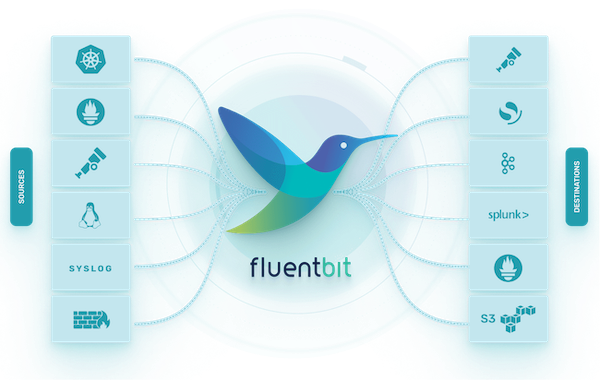
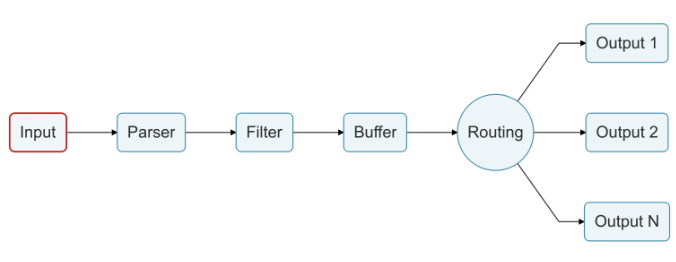
fluentbit 는 고성능/저비용을 위해 설계되었으며 450KB 으로도 실행 가능하다. 추상화된 I/O 처리기는 비동기 및 event-driven, read/write, retry, buffer 방식을 정의할 수 있다.
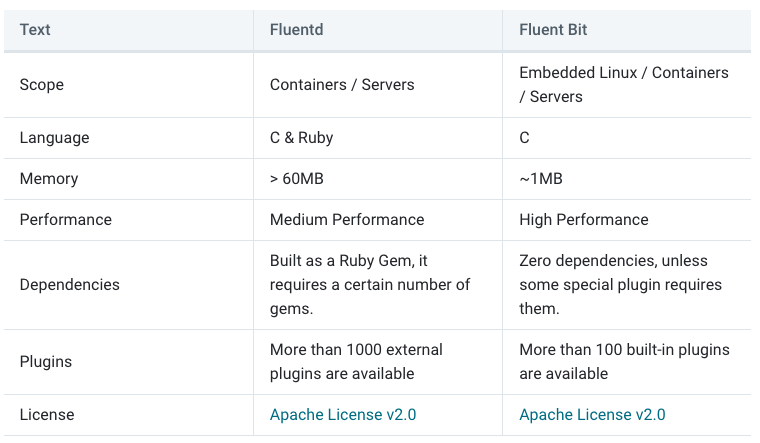
fluentd 와 fluentbit 의 차이는 아래와 같다.
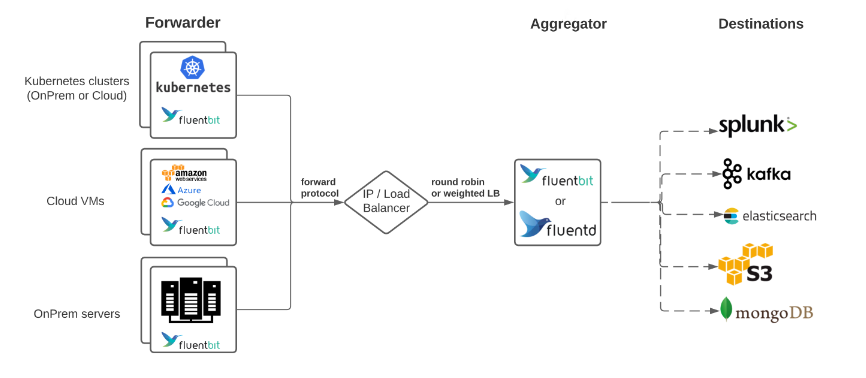
fluentbit 의 다양한 아키텍처 컨셉.
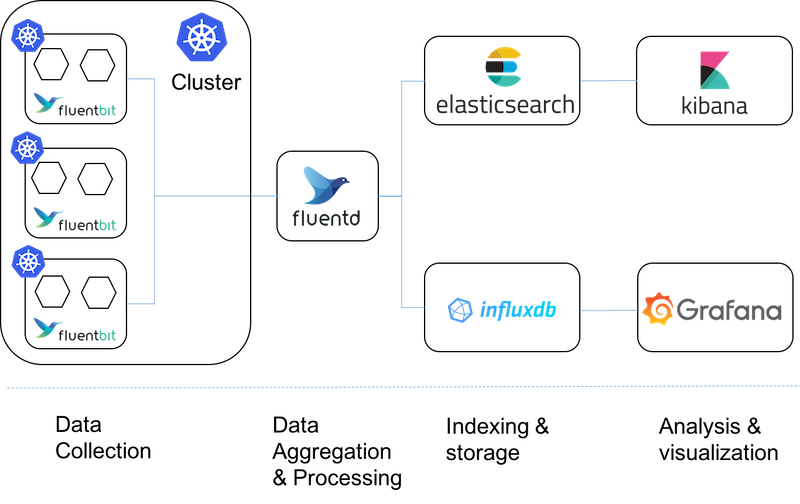
저비용 방식인 fluentbit 를 k8s daemonset 으로 사용하고, 중간에 로그 통합, 변조 가능한 fluentd 를 사용한다.
로컬 테스트
작성한 fluentbit 를 배포하기 전에 로컬에서 테스트할 수 있음.
파싱해야할 로그데이터, fluentbit 설정을 volume 으로 설정하고 아래 docker-compose 실행.
1
2
3
4
5
6
7
version:"3.7" services: fluent-bit: image:cr.fluentbit.io/fluent/fluent-bit volumes: -./etc:/fluent-bit/etc# fluentbit data pipeline 설정 -./log:/demo# 테스트할 로그파일을 /log 에 저장
# parser.conf
[PARSER]
    Name        docker_json
    Format      json
    Time_Key    time
    Time_Format %Y-%m-%dT%H:%M:%S.%L
    Time_Keep   On

[PARSER]
    Name        springboot_log
    Format      regex
    Regex       ^(?<time>\d{4}-\d{2}-\d{2}T\d{2}:\d{2}:\d{2}\.\d{3}\+\d{2}:\d{2})\s+(?<level>\w+)\s+(?<pid>\d+)\s+---\s+\[(?<thread>[^\]]+)\]\s+\[\s+(?<logger>[^\]]+)\]\s+(?<source>[^\s+:]+)\s+:\s+(?<message>.+)$
    Time_Key    time
    Time_Format %Y-%m-%dT%H:%M:%S.%L%z

[MULTILINE_PARSER]
    name          springboot_multiline
    type          regex
    flush_timeout 1000
    # rules |   state name  | regex pattern                  | next state
    # ------|---------------|--------------------------------------------
    # 문자로 시작하는 줄을 멀티라인 로그의 시작으로 식별, 보통 spring boot 로그는 시간(숫자)로 시작함
    Rule     "start_state"   "^[^\d]"                         "multi_line"
    # 멀티라인 로그 처리를 계속
    Rule     "multi_line"    "/.*/"                           "multi_line"
Spring Boot 버전에 따라 시간출력 형태가 다름으로 Regex 변경 필요, ChatGPT 를 사용하면 잘 출력해준다.
docker 컨테이너가 출력하는 /var/log/containers/*.log 로그파일을 tail 하는데 모든 로그형태가 json 이기에, 이를 한번 파싱하기 위해 docker_json 를 정의한다.
파싱된 로그안에는 SpringBoot 기본 로그, 에러 혹은 기타 출력물의 멀티라인 형태 로그가 구성되어있다.
이를 파싱하기 위해 springboot_log, springboot_multiline 를 정의한다.
INPUT, OUTPUT, FILTER
위에서 정의한 PARSER 를 INPUT, FILTER 에서 적저히 사용하고 OUPUT 으로 내보내야 한다. 그리고 태그에 docker.spring 를 설정해서 하나의 파이프라인으로 처리되도록 설정.
# value.yaml
config:
  service: |
    ...
  inputs: |
    [INPUT]
        Name tail
        Path /var/log/containers/demo-*.log
        Parser      docker_json
        read_from_head   true
        Tag  docker.spring

  filters: |
    [FILTER]
        Name parser
        Match docker.spring
        Key_Name log
        Parser springboot_log

    [FILTER]
        Name Multiline
        Match docker.spring
        multiline.key_content log
        multiline.parser springboot_multiline
    ...
  customParsers: |
    [PARSER]
        Name        docker_json
        Format      json
        Time_Key    time
        Time_Format %Y-%m-%dT%H:%M:%S.%L
        Time_Keep   On

    [PARSER]
        Name        springboot_log
        Format      regex
        Regex       ^(?<timestamp>\d{4}-\d{2}-\d{2}T\d{2}:\d{2}:\d{2}\.\d{3}\+\d{2}:\d{2})\s+(?<level>\w+)\s+(?<pid>\d+)\s+---\s+\[(?<thread>[^\]]+)\]\s+\[\s*(?<logger>[^\]]+)\]\s+(?<class>[^\s*:]+)\s+:\s+(?<message>.+)$
        Time_Key    time
        Time_Format %Y-%m-%dT%H:%M:%S.%L%z

    [MULTILINE_PARSER]
        name          springboot_multiline
        type          regex
        flush_timeout 1000
        # rules |   state name  | regex pattern                  | next state
        # ------|---------------|--------------------------------------------
        # 문자로 시작하는 줄을 멀티라인 로그의 시작으로 식별
        Rule     "start_state"   "^[^\d]"                         "multi_line"
        # 멀티라인 로그 처리를 계속
        Rule     "multi_line"    "/.*/"                           "multi_line"

  outputs: |
    [OUTPUT]
        Name stdout
        Match docker.spring

    [OUTPUT]
        Name  loki
        Host  loki-write.loki.svc.cluster.local
        Port  3100
        Uri   /loki/api/v1/push
        Match docker.spring
        Tls   off
        labels  job=demo-project
        label_keys   $level,$logger,$source