k8s - Service, Ingress, MetalLB!

Service

https://kubernetes.io/ko/docs/concepts/services-networking/service/
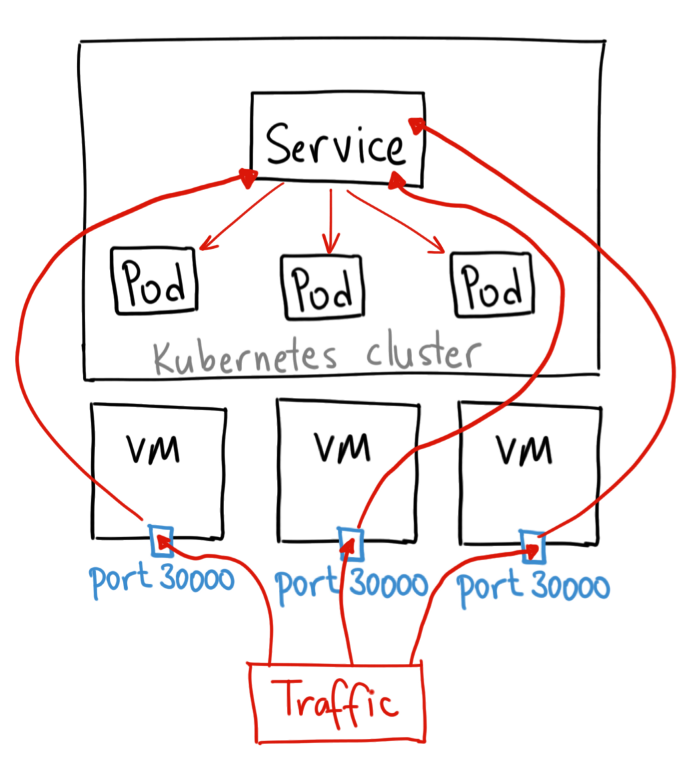
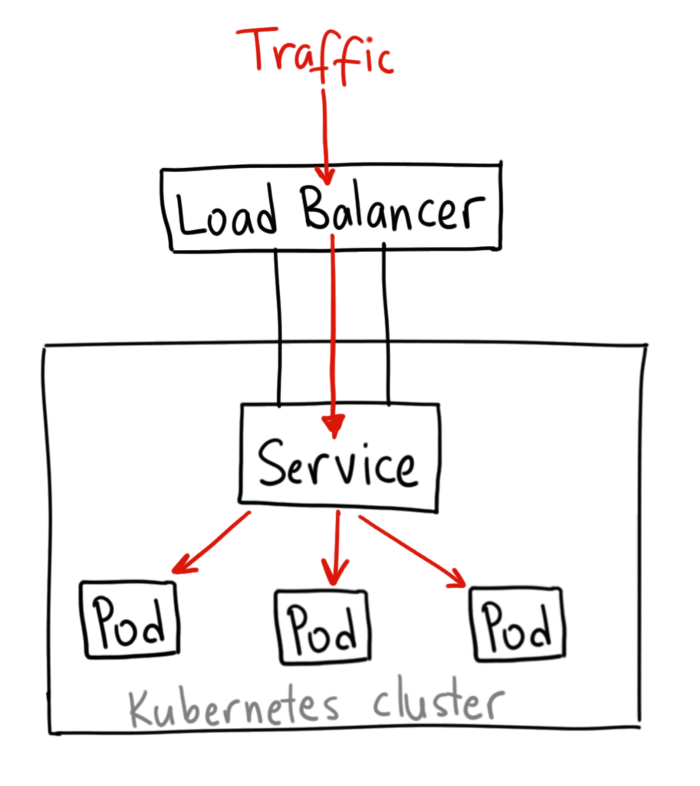
출처: https://medium.com/google-cloud/kubernetes-nodeport-vs-loadbalancer-vs-ingress-when-should-i-use-what-922f010849e0

pod 는 동일한 공간에서 항상 생성되지 않기 때문에 pod 끼리 접근할 수 있도록 연결구성이 필요하다.

이때 클러스터 내부 pod 간의 연결구성이 Service 라 할 수 있다.

각 노드별로 kube-proxy 를 가지고 있으며 Service 관련 yaml 을 작성하면, 각 노드의 kube-proxy[userspace, iptables, IPVS] 등을 기능을 사용해 패킷 라우팅을 구현한다.

IPVS (IP Virtual Server) 는 리눅스 L4 로드밸런싱 기능,

Service 타입

Service 타입에는 크게 4가지가 존재한다.

  • ClusterIP(default)
    클러스터 내부 서비스끼리만 통신시 사용하는 Service
  • NodePort
    클러스터 외부에서 내부로 접근할 수 있는 가장 쉬운 방법,
    외부에서 접근가능하도록 외부포트를 30000-32768 범위내 지정,
    외부포트를 통해 Pod 접근 할 수 있다.
  • LoadBalancer(ExternalIp)
    공인 IP 가 설정된 로드밸런서 장비가 있어야 한다.
    AWS, GCP 등의 퍼블릭 클라우드 서비스에서 지원한다.
    MetalLB 오픈소스를 사용해 로컬 클러스터에서도 제한적으로 사용 가능.
  • ExternalName
    spec.externalName 필드에 설정한 값과 연결,
    클러스터내부에서 외부로 접근할 때 주로 사용.

ClusterIP

아래와 같이 Service 생성 후, 다른 Pod 에서 미리 생성해둔 Nginx Pod 에 접근 테스트.

1
2
3
4
5
6
7
8
9
10
11
12
13
## clusterip-service.yaml
apiVersion: v1
kind: Service
metadata:
name: clusterip-service
spec:
type: ClusterIP
selector:
app: nginx-for-svc # 해당 app 으로 요청 라우팅
ports:
- protocol: TCP
port: 80 ## 서비스가 사용할 포트
targetPort: 80 ## selector app 포트

테스트를 위해 Service 를 통해 접근하는 Nginx Pod 생성

1
2
3
4
5
6
7
8
9
10
# nginx app 생성
kubectl run nginx-for-service --image=nginx --port=80 --labels="app=nginx-for-svc"
# service 생성
kubectl apply -f clusterip-service.yaml
# testnet pod 에서 nginx app 에 접근 테스트
kubectl run -it --image nicolaka/netshoot testnet bash
curl http://clusterip-service
# <!DOCTYPE html> ..c.. </html>
curl http://clusterip-service.default.svc.cluster.local
# <!DOCTYPE html> ..c.. </html>

NodePort

1
2
3
4
5
6
7
8
9
10
11
12
13
14
## nodeport.yaml
apiVersion: v1
kind: Service
metadata:
name: nodeport-service
spec:
type: NodePort
selector:
app: nginx-for-svc
ports:
- protocol: TCP
port: 80 ## service 가 사용할 포트
targetPort: 80 ## selector app 포트
nodePort: 30000 ## 노드외부 노출할 포트
1
2
3
4
5
6
7
8
9
10
11
12
13
14
15
16
17
# nginx app 생성
kubectl run nginx-for-service --image=nginx --port=80 --labels="app=nginx-for-svc"
# service 생성
kubectl apply -f nodeport-service.yaml
# testnet pod 에서 nginx app 에 접근 테스트
kubectl run -it --image nicolaka/netshoot testnet bash
curl http://nodeport-service
# <!DOCTYPE html> ..c.. </html>
curl http://nodeport-service.default.svc.cluster.local
# <!DOCTYPE html> ..c.. </html>

# 외부 클라이언트에서 접근 테스트
# 현재 2개 노드가 아래와 같은 ip 에서 동작중
curl http://192.168.10.2:30000
# <!DOCTYPE html> ..c.. </html>
curl http://192.168.10.3:30000
# <!DOCTYPE html> ..c.. </html>

NodePort 가 ClusterIP 개념을 포함함으로, 클러스터 내부에서도 해당 Service 에 접근 가능하다.
외부에선 nodePort30000 을 통해 접근한다.

kucbe8

ExternalName

내부에서 외부로 가기위한 서비스이다.

1
2
3
4
5
6
7
8
## externalname.yaml
apiVersion: v1
kind: Service
metadata:
name: externalname-service
spec:
type: ExternalName
externalName: google.com
1
2
3
4
5
6
7
8
$ kubectl apply -f externalname.yaml

$ kubectl get svc
NAME TYPE CLUSTER-IP EXTERNAL-IP PORT(S) AGE
externalname-service ExternalName <none> google.com <none> 30s

$ kubectl run -it --image nicolaka/netshoot testnet bash
bash-5.1## curl externalname-service.default.svc.cluster.local

LoadBalancer

밑의 MetalLB 에서 추가 설명

1
2
3
4
5
6
7
8
9
10
11
12
13
## loadbalancer.yaml 
apiVersion: v1
kind: Service
metadata:
name: loadbalancer-service
spec:
type: LoadBalancer
selector:
app: nginx-for-svc
ports:
- protocol: TCP
port: 80 ## service 가 사용할 포트
targetPort: 80 ## 파드 접근 포트

kucbe9

MetalLB(LoadBalancer), Ingress Controller 설치

https://metallb.universe.tf/
https://metallb.universe.tf/configuration/
https://github.com/metallb/metallb

기존 베어메탈 클러스터 환경에서 Pod 에 접근하기 위해 NodePort Service 를 사용해왔다.
NodePort 의 경우 포트범위가 30000 - 32768 임으로 가독성 있는 endpoint 작성이 힘들다.

AWS EKS 같은 상용 클러스터에선 프로비저닝 되는 LoadBalancer Service 를 사용할 수 있는데,
MetalLB 를 사용하면 베어메탈 클러스터에서도 LoadBalancer Service 생성이 가능하다.

1
2
3
4
5
6
7
8
9
10
11
12
13
14
15
16
17
18
19
curl https://raw.githubusercontent.com/metallb/metallb/v0.13.12/config/manifests/metallb-native.yaml -o metallb.yaml
kubectl apply -f metallb.yaml

kubectl get all -n metallb-system
NAME READY STATUS RESTARTS AGE
pod/controller-786f9df989-2924n 1/1 Running 1 (83d ago) 84d
pod/speaker-5tf4z 1/1 Running 2 (83d ago) 84d

NAME TYPE CLUSTER-IP EXTERNAL-IP PORT(S) AGE
service/webhook-service ClusterIP 10.97.105.3 <none> 443/TCP 84d

NAME DESIRED CURRENT READY UP-TO-DATE AVAILABLE NODE SELECTOR AGE
daemonset.apps/speaker 1 1 1 1 1 kubernetes.io/os=linux 84d

NAME READY UP-TO-DATE AVAILABLE AGE
deployment.apps/controller 1/1 1 1 84d

NAME DESIRED CURRENT READY AGE
replicaset.apps/controller-786f9df989 1 1 1 84d

MetalLB 에서 구성할 수 있는 모드로는 다음 2가지

  • Layer2 모드
  • Layer3 모드(BGP 모드)

로컬네트워크안에 모든 노드가 존재한다면 Layer2 를 사용하면 된다.
여기선 Layer2 모드를 사용한다.

addresses 에 사용가능한 LoadBalancer 의 IP 작성, MetalLB 에선 가지고 있는 노드의 IP 목록을 작성하면 된다.
하나의 노드로 클러스터를 구성하였음으로 IP 하나만 작성.

1
2
3
4
5
6
7
8
9
10
11
12
13
14
15
16
17
18
# metallb-config.yaml
apiVersion: metallb.io/v1beta1
kind: IPAddressPool
metadata:
name: first-pool
namespace: metallb-system
spec:
addresses:
- 192.168.10.XXX/32 # 노드가 한개뿐이기에 IP 도 한개

apiVersion: metallb.io/v1beta1
kind: L2Advertisement
metadata:
name: example
namespace: metallb-system
spec:
ipAddressPools:
- first-pool

이제부터 LoadBalancer Service 생성이 가능하다.

AWS EKS 에서 Ingress 사용시 자체 제공하는 Application Load Balancers 로 프로비저닝 Ingress Controller 가 동작한다.
로컬 클러스터에서 L7 LB 역할을 해줄 Ingress Controller 소프트웨어는 가장 유명하고 공식지원하는 ingress-nginx 를 사용한다.

이 외에도 HAProxy, Kong 등 여러가지 Ingress Controller 가 있다.

설치 완료했다면 기존 ingress-controllerNodePort 로 운영하던 서비스를 LoadBalancer 로 변경

기본적으로 LoadBalancer ServiceIngress 를 고려하지 않아 IP 하나가지고 여러개의 LoadBalacner Service 가 생성될 수 없다.

앞으로 생성할 모든 LoadBalance Servicemetallb.universe.tf/allow-shared-ip 주석을 추가하여 선택적 IP 공유를 활성화할 수 있다.

1
2
3
4
5
6
7
8
9
10
11
12
13
14
15
16
17
18
19
20
21
22
23
24
25
26
27
28
29
30
31
32
33
34
35
36
37
38
39
40
41
42
# MetalLB 설치
kubectl apply -f https://raw.githubusercontent.com/metallb/metallb/v0.14.5/config/manifests/metallb-native.yaml

# MetalLB 파드가 준비될 때까지 대기
kubectl wait --namespace metallb-system \
--for=condition=ready pod \
--selector=app=metallb \
--timeout=90s

# MetalLB IP Pool 설정 (단일 노드: 192.168.10.232)
# 중요: autoAssign: true와 L2Advertisement의 spec.ipAddressPools 필수!
cat <<EOF | kubectl apply -f -
apiVersion: metallb.io/v1beta1
kind: IPAddressPool
metadata:
name: default-pool
namespace: metallb-system
spec:
addresses:
- 192.168.10.232/32
autoAssign: true

apiVersion: metallb.io/v1beta1
kind: L2Advertisement
metadata:
name: default
namespace: metallb-system
spec:
ipAddressPools:
- default-pool
EOF

# MetalLB 컨트롤러 재시작 (IPAddressPool 인식)
kubectl rollout restart deployment controller -n metallb-system
kubectl rollout status deployment controller -n metallb-system

# 설정 확인
kubectl get ipaddresspool -n metallb-system
kubectl get l2advertisement -n metallb-system

# IPAddressPool Status 확인 (Status 섹션이 나타나야 함)
kubectl describe ipaddresspool default-pool -n metallb-system
1
2
3
4
kubectl get service -n ingress-nginx
NAME TYPE CLUSTER-IP EXTERNAL-IP PORT(S) AGE
ingress-nginx-controller LoadBalancer 10.110.2.122 192.168.10.XXX 80:30080/TCP,443/TCP 107d
ingress-nginx-controller-admission ClusterIP 10.97.61.128 <none> 443/TCP 107d

NGINX Ingress Controller를 MetalLB와 연동하여 설치.

1
2
3
4
5
6
7
8
9
10
11
12
13
14
# NGINX Ingress Controller 설치
kubectl apply -f https://raw.githubusercontent.com/kubernetes/ingress-nginx/controller-v1.11.1/deploy/static/provider/cloud/deploy.yaml

# Ingress Controller 파드가 준비될 때까지 대기
kubectl wait --namespace ingress-nginx \
--for=condition=ready pod \
--selector=app.kubernetes.io/component=controller \
--timeout=90s

# Ingress Controller Service를LoadBalancer 타입으로 변경 (MetalLB가 IP 할당)
kubectl patch svc ingress-nginx-controller -n ingress-nginx -p '{"spec":{"type":"LoadBalancer"}}'

# 할당된 IP 확인
kubectl get svc -n ingress-nginx ingress-nginx-controller
  • 설정 확인:
    • EXTERNAL-IP가 192.168.10.232로 할당되었는지 확인
    • <pending> 상태인 경우 아래 진단 단계 참조
1
2
3
4
5
6
7
kubectl get deploy,svc -n ingress-nginx
# NAME READY UP-TO-DATE AVAILABLE AGE
# deployment.apps/ingress-nginx-controller 1/1 1 1 4d3h

# NAME TYPE CLUSTER-IP EXTERNAL-IP PORT(S) AGE
# service/ingress-nginx-controller LoadBalancer 10.43.206.164 192.168.10.232 80:30598/TCP,443:30261/TCP 4d3h
# service/ingress-nginx-controller-admission ClusterIP 10.43.36.15 <none> 443/TCP 4d3h

Ingress

Ingress: 입장권
https://kubernetes.io/ko/docs/concepts/services-networking/ingress/

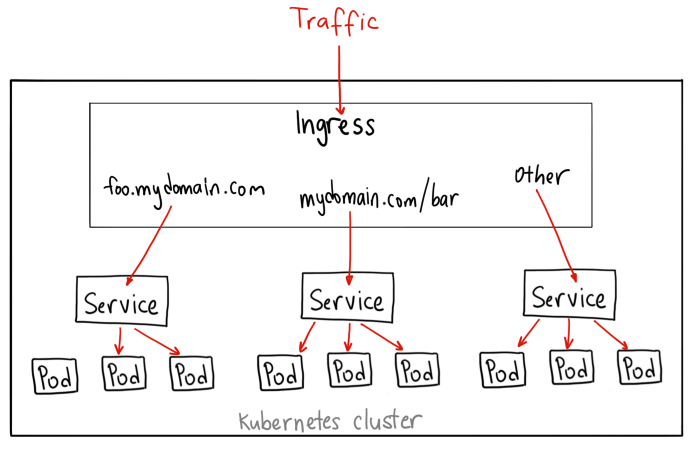
클러스터 내부에서 동작하는 L7 LB. 하나의 외부 IP와 포트로 여러개의 서비스를 로드밸런싱할 수 있다.
공인IP 가 귀하다 보니 IngressLoadBalancer 에 등록해서 여러개의 트래픽을 분산처리하는데 사용한다.

Ingress = L7
Service = L4

ServiceIngress 모두 클러스터 외부로 포트를 노출, 로드밸런싱 기능을 포함한다.
kucbe10

먼저 Ingress 를 통해 접근할 앱을 Pod, Service 정의

1
2
3
4
5
6
7
8
9
10
11
12
13
14
15
16
17
18
19
20
21
22
23
24
25
26
27
28
29
30
31
32
33
34
35
36
37
38
39
40
41
42
43
44
45
46
47
48
# apple-banana-service.yaml
kind: Pod
apiVersion: v1
metadata:
name: apple
labels:
app: apple
spec:
containers:
- name: apple
image: hashicorp/http-echo
imagePullPolicy: IfNotPresent
args:
- "-text=apple"

kind: Service
apiVersion: v1
metadata:
name: apple
spec:
selector:
app: apple
ports:
- port: 5678 # Default port for image

kind: Pod
apiVersion: v1
metadata:
name: banana
labels:
app: banana
spec:
containers:
- name: banana
image: hashicorp/http-echo
imagePullPolicy: IfNotPresent
args:
- "-text=banana"

kind: Service
apiVersion: v1
metadata:
name: banana
spec:
selector:
app: banana
ports:
- port: 5678 # Default port for image

생성 후 연결 및 요청 테스트.

1
2
3
4
5
6
7
8
9
10
11
12
13
14
kubectl apply -f apple-banana-service.yaml

kubectl port-forward service/apple 8080:5678
# Forwarding from 127.0.0.1:8080 -> 5678
# Forwarding from [::1]:8080 -> 5678

kubectl port-forward service/banana 8081:5678
# Forwarding from 127.0.0.1:8081 -> 5678
# Forwarding from [::1]:8081 -> 5678

curl localhost:8080
# apple
curl localhost:8081
# banana

사전에 Ingress ControllerNodePort Service 로 등록해두었다.
해당 NodePortingress 를 통해 apple, banana 서비스에 접근할 수 있도록 설정.

이때 path 를 사용해 요청을 분기시킨다.

1
2
3
4
5
6
7
8
9
10
11
12
13
14
15
16
17
18
19
20
21
22
23
24
25
26
27
# apple-banana-ingress.yaml
apiVersion: networking.k8s.io/v1
kind: Ingress
metadata:
name: http-echo
annotations:
kubernetes.io/ingress.class: "nginx"
kubernetes.io/ssl-redirect: "false"
ingress.kubernetes.io/rewrite-target: /
spec:
rules:
- http:
paths:
- path: /apple
pathType: Prefix
backend:
service:
name: apple
port:
number: 5678
- path: /banana
pathType: Prefix
backend:
service:
name: banana
port:
number: 5678
1
2
3
4
5
6
7
8
9
10
11
12
13
14
15
16
17
18
19
20
21
22
23
24
25
26
27
kubectl apply -f apple-banana-ingress.yaml

curl 192.168.10.228/banana
# banana
curl 192.168.10.228/apple
# apple

kubectl describe ingress http-echo
# Name: http-echo
# Labels: <none>
# Namespace: default
# Address: 192.168.10.228
# Ingress Class: <none>
# Default backend: <default>
# Rules:
# Host Path Backends
# ---- ---- --------
# *
# /apple apple:5678 (192.168.10.180:5678)
# /banana banana:5678 (192.168.10.176:5678)
# Annotations: ingress.kubernetes.io/rewrite-target: /
# kubernetes.io/ingress.class: nginx
# kubernetes.io/ssl-redirect: false
# Events:
# Type Reason Age From Message
# ---- ------ ---- ---- -------
# Normal Sync 89s (x2 over 89s) nginx-ingress-controller Scheduled for sync

k8s 네트워킹

k8s에선 컨테이너간 통신, kuberctl 을통한 명령어 실행을 해야하는데 k8s 네트워킹을 알아보자.

kubnet

kubnetk8s 표준 네트워크 플러그인이다.
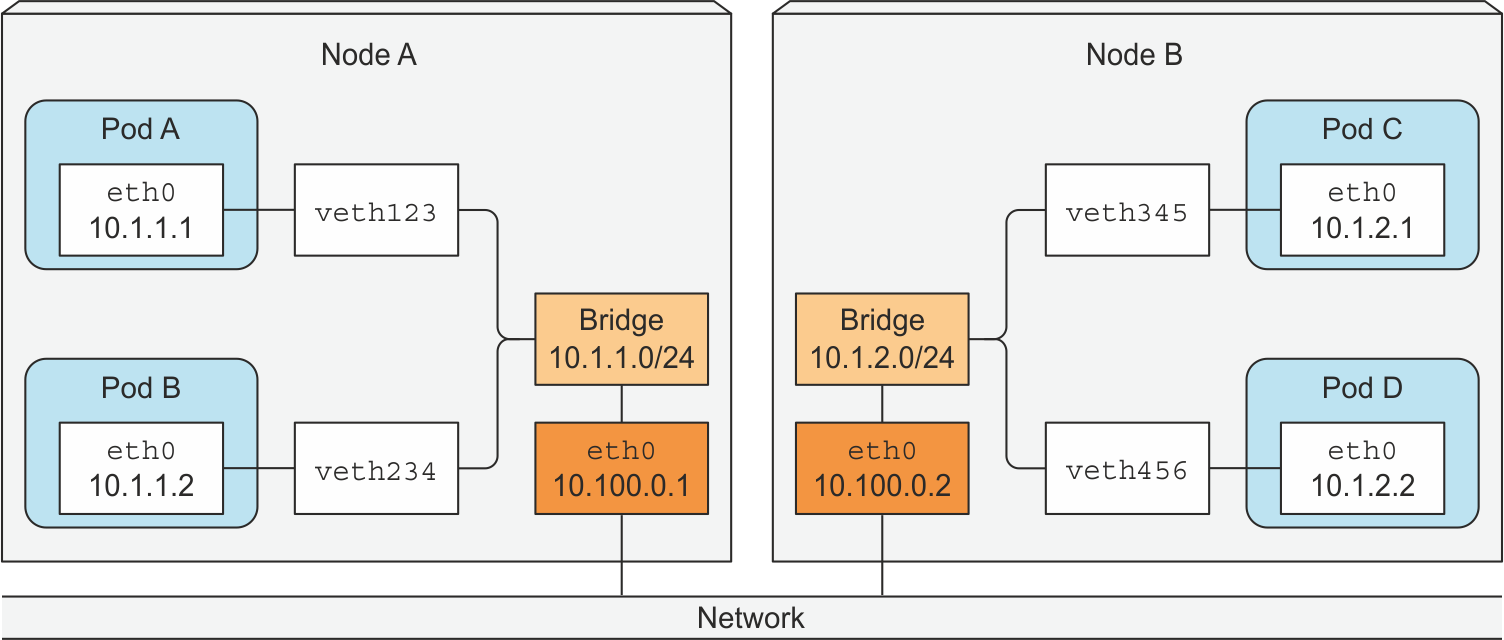
k8s 내부에서 자동으로 이런 네트워크 구조와 라우팅 테이블을 유지된다.

노드간 연결은 10.100.0.0/16
각 노드내부 CIDR은 10.1.1.0/24, 10.1.2.0/24
Pod 별로 가상 이더넷 인터페이스 할당 후 IP 부여

kube5

Pod IP는 클러스터 전체에서 검사 후 결정된다, 그리고 중복되지 않는 Pod CIDR을 할당한다.
Pod 통신지원을 위해 특정 Pod 에 접근할 수 있는 노드의 인터페이스를 라우팅 테이블에 기록한다.

Pod Network

출처: https://medium.com/google-cloud/understanding-kubernetes-networking-pods-7117dd28727

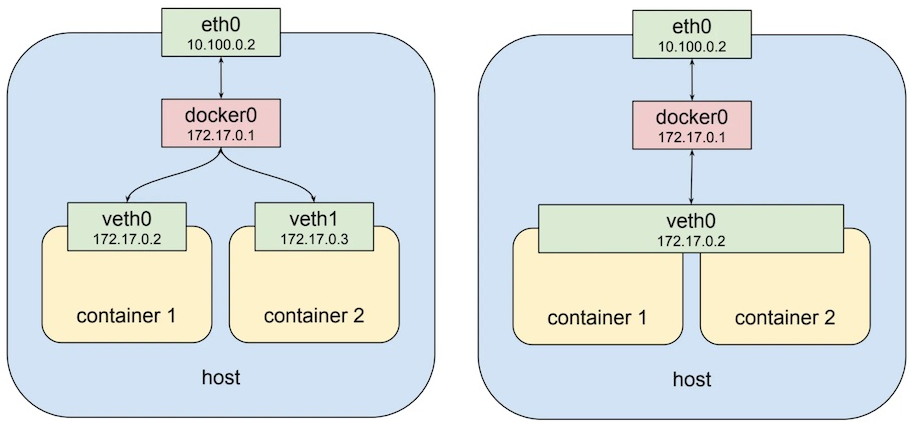
도커 네트워킹에서 베스(veth, virtual ethernet) 라는 가상 장치를 사용해서 IP 를 부여하는데 k8s에선 파드 단위로 컨테이너들을 관리한다.

좌측이 도커 네트워크 구조, 우측이 파드 네트워킹 구조이다.
kucbe11

파드 네트워킹에서 파드당 하나의 virtual ethernet 생성되고 파드에 속한 컨테이너들은 virtual ethernet 하나를 공유한다 컨테이너들은 이 하나의 IP 를 공유한다.

Pod 내부에선 localhost 를 통해 컨테이너간 통신이 가능하다.

1
2
3
4
5
6
7
8
9
10
11
apiVersion: v1
kind: Pod
metadata:
name: podnet-01
spec:
containers:
- name: web # web container 생성
image: nginx
- name: ubuntu # ubuntu container 생성
image: ubuntu:16.04
command: ["/bin/sh", "-c", "while : ;do curl http://localhost/; sleep 10; done"]

생성된 ubuntu 컨테이너에서 web 컨테이너localhsot 를 통해 요청할 수 있다.

Service Network

출처: https://arisu1000.tistory.com/27851?category=787056

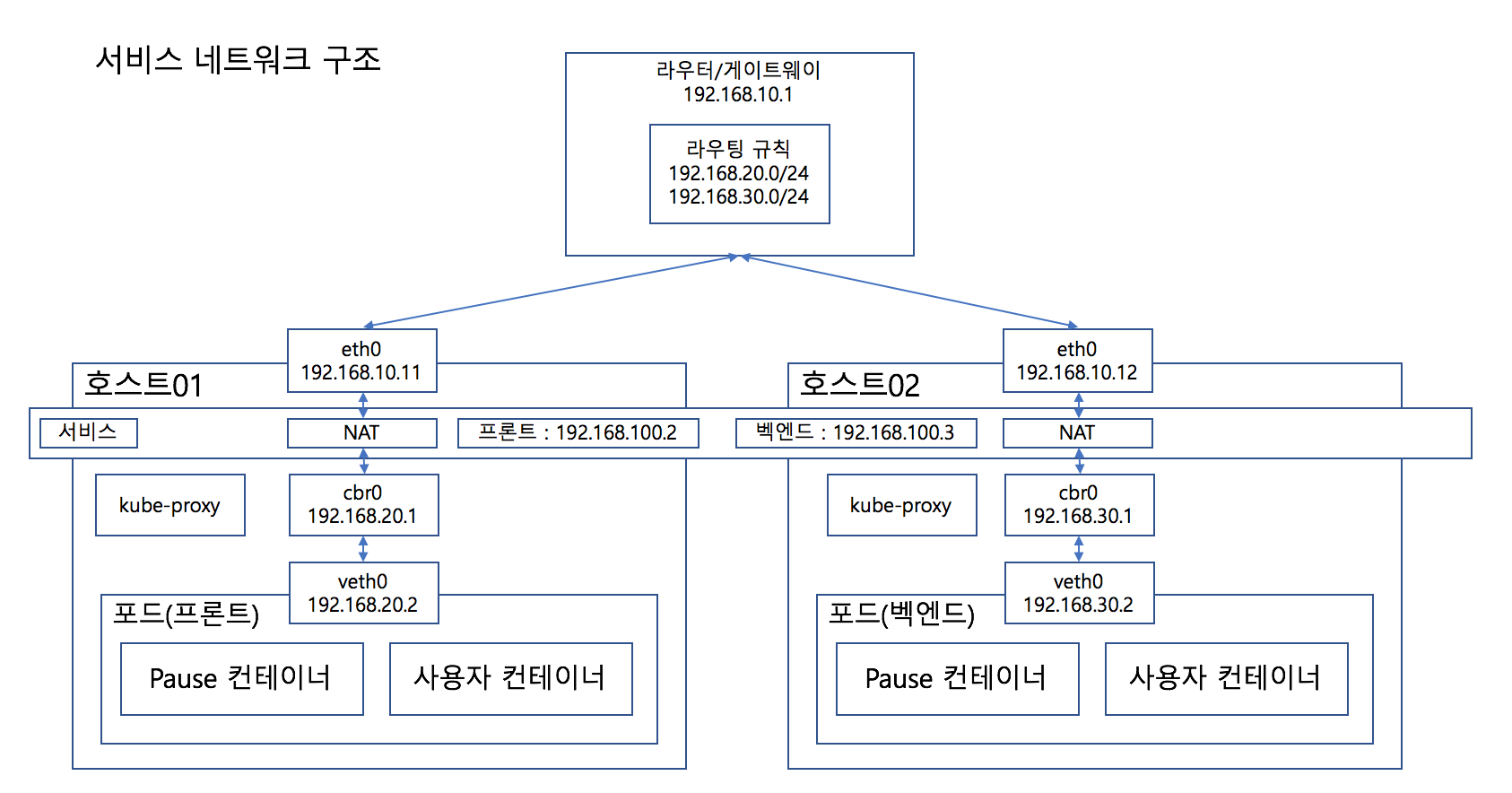
Service 가 생성되면 각 노드 NAT 에 별개의 대역을 가진 Service 전용 IP 가 추가되며,
NAT 테이블엔 Service IPPod IP 가 매핑된다.
해당 Servuce IP 로 접근시 파드로의 접근이 진행된다.
kucbe13

노드 컴포넌트인 kube-proxy 가 해당 역할을 수행하며 NAT 테이블을 만든다.

kube-proxy 가 직접 패킷을 받는 서버는 아니고 iptables 만 수정하는 컴포넌트이다.
실제 패킷은 리눅스의 넷필터(netfilter) 가 처리한다.

NodePort 로 만들시 각 클러스터의 NAT 에만 추가되는 것이 아닌 게이트웨이에도 라우팅 테이블이 추가된다.

CNI(Container Network Interface)

출처: https://github.com/dybooksIT/kubernetes-book/blob/master/readme/errata/errata.md

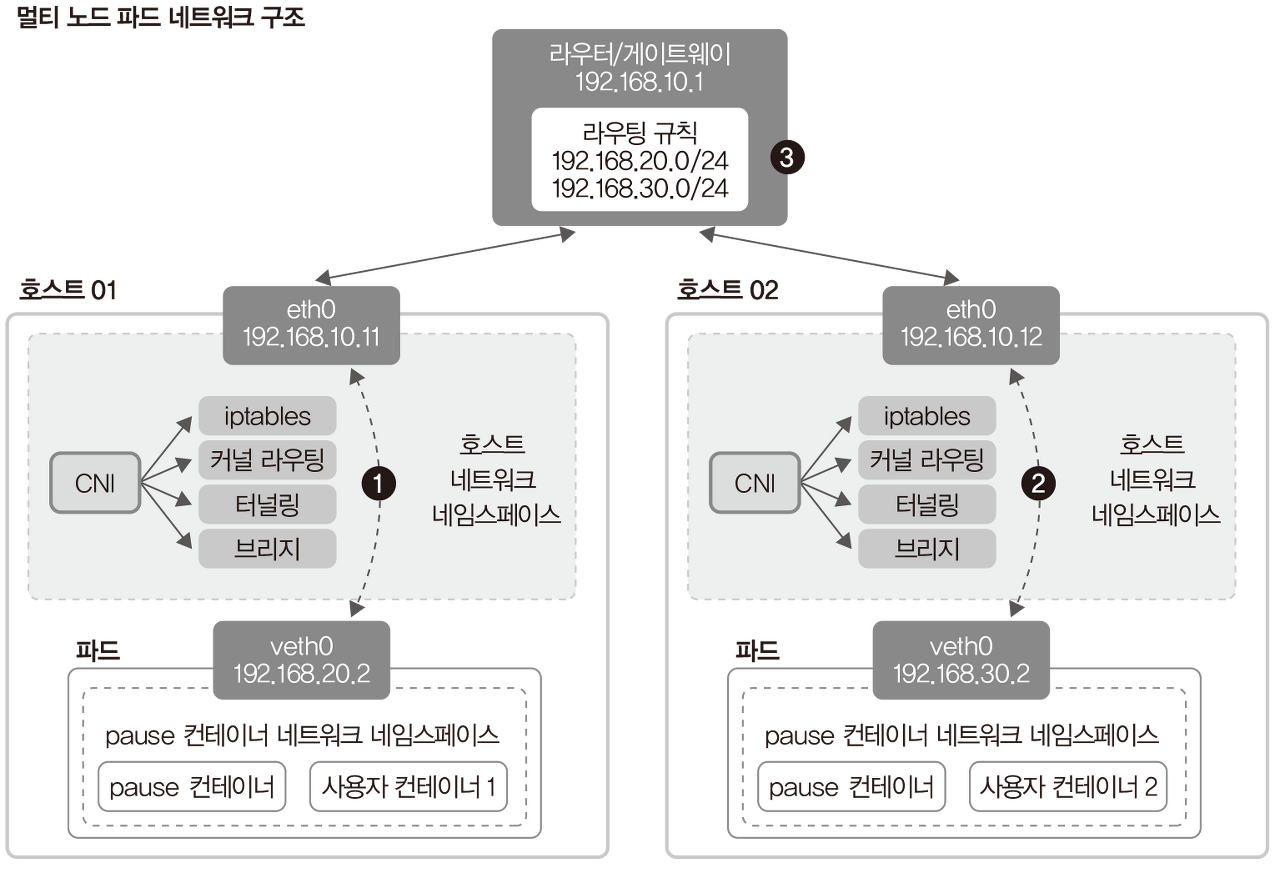
k8s 에서는 Pod 각각이 모두 고유의 IP를 갖도록 구성하기에
CNI(Container Network Interface)라는 플러그인을 사용한다.
kucbe12

CNI 는 각 노드마다 별도의 Pod CIDR 대역을 설정,기록,공유 하고 아래와 같은 기능들을 수행한다.

  • 커널 라우팅
  • 동적 라우팅
  • veth 생성 및 IP, Subnet, Routing Table 설정
  • Proxy ARP 기능

CNI 의 구현체로 플라넬, 칼리코, 실리엄 이 있으며 네트워크 플러그인에 따라서 호스트 네트워크를 구성하는 방법과 특성이 다르다.

k8s DNS

Service 간 통신에서 클러스터 안에서만 사용하는 DNS를 설정해서 사용한다.
{service-name}.{name-space}.svc.cluster.local

1
2
3
4
5
6
7
8
9
10
11
12
13
14
15
apiVersion: v1
kind: Service
metadata:
namespace: monitoring
labels:
app: prometheus-app
name: prometheus-app
spec:
type: NodePort
ports:
- nodePort: 30990
port: 9090
targetPort: 9090
selector:
app: prometheus-app

만약 위와같은 서비스 정의시에 도메인은 아래와 같다.

prometheus-app.monitoring.svc.cluster.local

파드에 접근할 수 있는 도메인 생성이 가능하다.

1
2
3
4
5
6
7
8
9
10
11
12
13
14
15
16
17
18
19
20
21
22
23
24
apiVersion: apps/v1
kind: Deployment
metadata:
name: kubernetes-simple-app
labels
app: kubernetes-simple-app
spec:
replicas: 1
selector:
matchLabels:
app: kubernetes-simple-app
template:
metadata:
labels:
app: kubernetes-simple-app
spec:
hostname: appname
subdomain: default-subdomain
dnsPolicy: ClusterFirst
containers:
- name: kubernetes-simple-app
image: arisu1000/simple-container-app:latest
ports:
- containerPort: 8080

spec에 도메인 관련 설정시 접근가능한 도메인은 아래와 같다.
appname.default-subdomain.default.svc.cluster.local
{host-name}.{sub-domain-name}.{namespace-name}.svc.cluster.local

coreDNS

DNS 질의를 처리해주는 coreDNS Pod, Service 가 존재한다.

1
2
3
4
5
6
7
8
9
kubectl get pod,svc -n kube-system
# NAME READY STATUS RESTARTS AGE
# coredns-6d4b75cb6d-jvhfg 1/1 Running 3 (103s ago) 16d
# coredns-6d4b75cb6d-qdbbr 1/1 Running 3 (103s ago) 16d
# ...

# NAME TYPE CLUSTER-IP EXTERNAL-IP PORT(S) AGE
# kube-dns ClusterIP 10.96.0.10 <none> 53/UDP,53/TCP,9153/TCP 16d
# ...

과거엔 kube-dns 파드를 사용했었으나 현재는 coreDNS 를 주로 사용, 서비스의 이름만 kube-dns 로 유지됨

coreDNSCorefile 설정파일을 통해 운영되며 컨피그맵으로 Corefile 을 설정할 수 있다.
기본으로 설정된 Corefile 컨피그맵은 아래와 같다.

1
2
3
4
5
6
7
8
9
10
11
12
13
14
15
16
17
18
19
20
21
22
23
24
25
26
27
28
29
30
31
32
33
34
35
36
37
38
kubectl describe configmap coredns -n kube-system

# Name: coredns
# Namespace: kube-system
# Labels: <none>
# Annotations: <none>

# Data
# ====
# Corefile: # 설정을 위한 파일
# ----
# .:53 { # DNS 를 위한 각종 플러그인
# # stdout 으로 에러로그 출력
# errors
# health { # 헬스체크
# lameduck 5s
# }
# ready
# kubernetes cluster.local in-addr.arpa ip6.arpa {
# # 모든 DNS 쿼리 응답, pods verified 변경시 같은 네임스페이스 DNS 쿼리만 응답
# pods insecure
# # DNS 찾기 실패시 동작, IP로 도메인을 찾는 리버스 쿼리 진행(IPv6 도 지원)
# fallthrough in-addr.arpa ip6.arpa
# ttl 30
# }
# # http://localhost:9153/metrics 주소로 프로메테우스 형식의 메트릭 정보 제공
# prometheus :9153
# # 외부형식 DNS 쿼리를 /etc/resolv.conf 에 설정된 외부 DNS 서버로 보내서 처리
# forward . /etc/resolv.conf {
# max_concurrent 1000
# }
# cache 30 # DNS 캐시 유지 초
# loop # 순환참조 발견시 coreDNS 프로세스 중지
# reload # CoreFile 실시간 감시 및 재시작(2min)
# loadbalance # 레코드를 라운드로빈 밸런스로 DNS 쿼리 응답
# }

# Events: <none>

Pod DNS Server 설정

1
2
3
4
5
6
7
8
9
10
11
12
13
14
15
16
17
18
19
apiVersion: v1
kind: Pod
metadata:
namespace: default
name: dns-test
spec:
containers:
- name: dns-test
image: arisu1000/simple-container-app:latest
dnsPolicy: ClusterFirst
dnsConfig:
nameservers:
- 8.8.8.8
searches:
- example.com
options:
- name: name01
value: value01
- name: name02

.spec.dnsPolicy 설정을 통해 k8s 에서 DNS 질의 우선순위 조절이 가능하다.

  1. Default - 노드의 DNS 설정에 따름
  2. ClusterFirst - 클러스터 외부 DNS 서버에 질의
  3. ClusterFirstWithHostNet - 파드를 호스트 모드로 사용하겠다고 설정
  4. None - k8s 클러스터 안 DNS 설정을 무시, 별도의 DNS 서버 설정 필요

.spec.dnsPolicy 설정을 통해 /etc/resolv.conf 에 들어갈 속성을 지정할 수 있다.

3가지 속성을 지정할 수 있다. nameservers, searches, options

1
2
3
4
5
6
kubectl exec dns-test cat /etc/resolv.conf

# nameserver 10.96.0.10
# nameserver 8.8.8.8
# search default.svc.cluster.local svc.cluster.local cluster.local example.com
# options name01:value01 name02 ndots:5

단순 서비스의 이름만 지정해도 자동으로 {service-name}.{namespace-name}.svc.cluster.local 으로 설정해서 찾기 때문에 정확한 위치를 찾을 수 있는것.