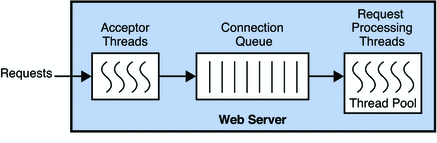
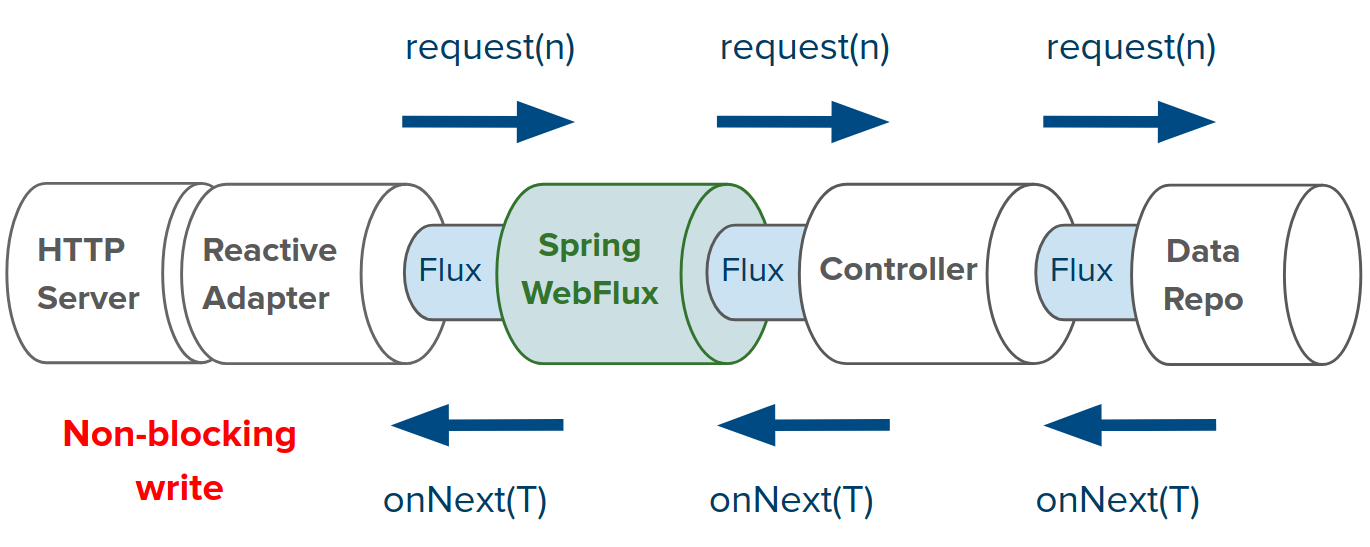
최근 웹 어플리케이션은 외부API 요청, DB로부터의 CRUD 가 전부인 경우가 많다, 복잡한 CPU Bound Job 보다는 외부의존성과 연결을 통해 IO Bound Job 이 더 많다는 뜻이다.
때문에 멀티스레드 & blocking 기반으로 동작하는 tomcat 은 요청이 몰렸을 때 외부 의존성(DB, API서버) 에 의해 blocking 되어 아무런 동작도 하지 않는상태로 대기중인 경우가 많아진다. CPU 사용률을 0% 에 가까워지고 요청이 완료되어 콜백 인터럽트가 발생하기만을 기다리게 되버린다.
스프링 코어 for Reactive
이는 파일 read write 에 대해서도 동일한 문제였기 때문에 했고, 위와같은 문제를 알고있는 개발자들도 프레임워크에 NIO 기능을 넣어 멀티스레드의 문제점을 해결해줬다.
Spring WebFlux 등장 배경은 아래 참고.
1990 년 linux 에서 NIO 기능을 지원하기 시작.
2004 년 netty 가 개발되어 NIO 웹서버를 쓸 수 있게 되었다.
2009 년 Nodejs 역시 NIO 기반으로 동작할 수 있는 프레임워크를 만들어주었다.
2009 년 비동기 서블릿(servlet 3.0) 이 출시했다.
Spring WebFlux 는 NIO 웹서버인 Netty 를 기반으로 2017년 Spring Framework 5.0 에 처음 도입되었다.
Netty 의 경우 이벤트 루프를 처리하는 스케줄러 가 사용하는 스레드 풀을 사용한다. 워커스레드 기본값은 Runtime.getRuntime().availableProcessors() * 2
스레드 풀에 의존하지 않고 이벤트 루프방식으로 요청을 처리하여 시스템 자원(메모리, 네트워크 소켓 디스크립터)만 충분하다면 4코어 서버에서 수만~수십만 커넥션을 동시에 처리할 수 있다.
publicMaybeReactiveAdapter() { /** * Descriptor for a reactive type that can produce 0..1 values. * @param type the reactive type * @param emptySupplier a supplier of an empty-value instance of the reactive type */ super(ReactiveTypeDescriptor.singleOptionalValue(Maybe.class, Maybe::empty), maybe -> ((Maybe<?>) maybe).toFlowable(), // Maybe->Publisher publisher -> Flowable.fromPublisher(publisher).singleElement()); // Publisher->Maybe } }
ReactiveAdapterRegistry 를 사용해 싱글턴 Instance 변수에 Adapter 용 코드를 작성해 필요할때 마다 꺼내어 쓸 수 있다.
springframework.core.io 에 저장된 DataBuffer, DataBufferUtils 를 사용하면 I/O 작업이 필요한 파일, 네트워크 자원으로 부터 리액티브 스트림 형태로 작업을 처리할 수 있다. jav.nio.ByteBuffer 클래스의 형변환 기능을 추가하여 보다 쉽게 사용 가능하다.
springframework.core.codec 에 정의된 인터페이스 Encoder, Decoder 를 사용하면 Non Blocking 방식으로 직렬화 데이터를 자바객체, 자바객체를 직렬화 데이터로 변환 가능하다.
WebFlux
Sprinb Boot 에 리액티브 웹서버를 위한 WebFlux 모델을 사용할 수 있도록 spring-boot-starter-webflux 라는 새로운 패키지를 추가할 수 있게 되었다.
해당 모듈은 Reactive Stream Adapter 위에 구축된며 Servlet 3.1+ 지원서버(Tomcat, Jetty 등), Netty, Undertow 서버엔진에서 모두 지원한다.
위의 엔진들은 java 8 에 추가된 java NIO 로 구현되어 HTTP 요청을 논블럭킹으로 처리한다.
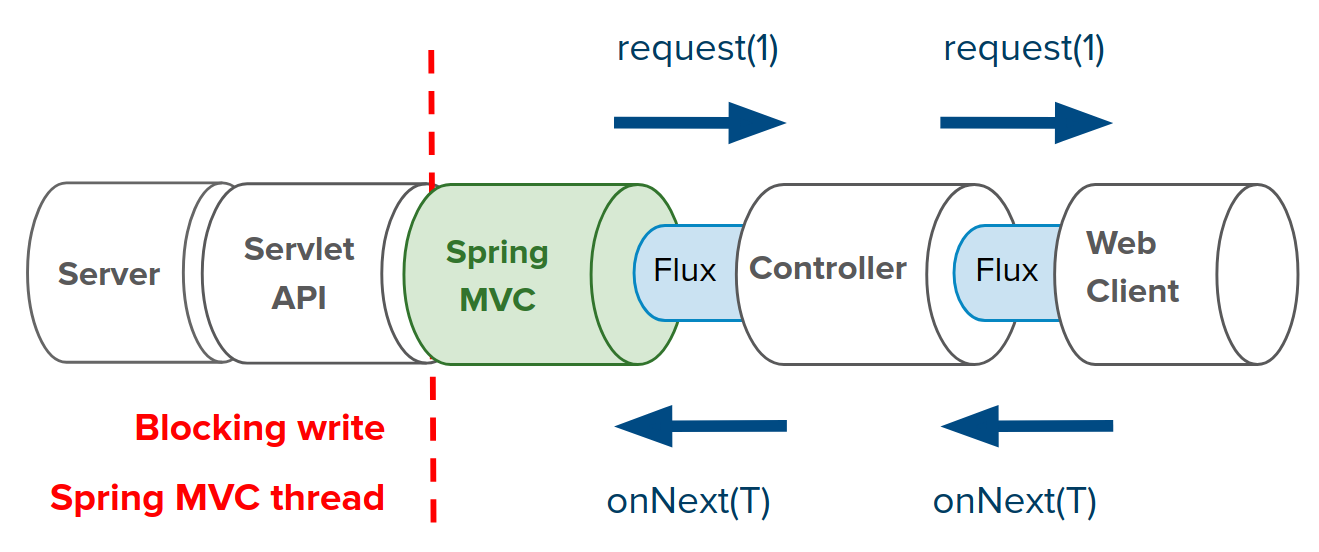
리액티브 방식을 사용하려면 Netty 와 같은 서버를 사용해야 하는데 서블릿 API 서버를 변경할 수 없다면 아래 그림과 같이 Spring MVC 를 사용하면서도 리액티브하게 개발할 수 있다.
물론 서블릿 API 사용하기에 블록킹/스레드풀 방식을 사용한다.
WebMVC 모듈도 Spring 5.0 에 이르러 spring-boot-starter-web 에서 Servlet 3.1 을 지원하면서 일부분은 리액티브 스트림을 지원하게 되었고 ResponseBodyEmitterReturnValueHandler 클래스가 업그레이드 되면서 ReactiveTypeHandler 필드를 사용해 WebMVC 의 인프라 구조를 크게 해치지 않고 컨트롤러 메서드가 반환하는 Flux, Mono, Flowable 등의 Publisher(리액티브 스트림)을 처리한다.
WebFlux - Flux
WebFlux 에서 Request, Response 어떻게 리액티브로 구현했는지 아래 인터페이스로 확인할 수 있다.
http://localhost:8080/api/user/{id} url 을 지원하는 간단한 웹서버 생성
1 2 3 4 5 6 7 8 9 10 11 12 13 14 15 16 17 18 19
@Slf4j publicclassTestWebServer { publicstaticvoidmain(String[] args) { HttpHandlerhttpHandler= RouterFunctions.toHttpHandler( // RouterFunction -> HttpHandler 변경 nest(path("/api"), route(GET("/users/{id}"), request -> { Stringid= request.pathVariable("id"); return ServerResponse.ok().syncBody("hello " + id + " user!"); // 반환데이터 동기적으로 생성 }) // end route ) // end nest ); ReactorHttpHandlerAdapterreactorHttpHandler=newReactorHttpHandlerAdapter(httpHandler); DisposableServerserver= HttpServer.create() .host("localhost").port(8080) .handle(reactorHttpHandler) .bindNow(); server.onDispose().block(); } }
WebClient 를 사용해 위 url 에 Http GET Request 요청
1 2 3 4 5 6 7 8 9 10 11
publicclassTestWebClient { publicstaticvoidmain(String[] args)throws InterruptedException { WebClient.create("http://localhost:8080/api") // WebClient 객체 생성 + baseUrl 설정 .get().uri("/users/{id}", 10) // method, uri 설정 .retrieve() // 응답 내용 설정. ResponseSpec 반환 .bodyToMono(String.class) // 응답 body 를 Mono 로 변환 .subscribe(s -> System.out.println(s)); // Mono 에 대한 구독 설정 // hello 10 user! Thread.sleep(1000); // main thread 종료 방지 } }
위의 WebClient 는 GET 방식이라 uri 만 설정했지만 API 에 따라 cookie, header, body 모두 설정 가능하다.
HTTP 응답을 처리할 수 있는 메서드가 retrieve() 와 exchage() 가 있는데
retrieve() 는 ResponseSpec 을 반환하고 exchage() 는 Mono<ClientResponse> 를 반환한다.
만약 exchange() 를 사용할 경우 아래와 같이 코드작성
1 2 3 4 5 6 7 8
publicstaticvoidmain(String[] args)throws InterruptedException { WebClient.create("http://localhost:8080/api") // WebClient 객체 생성 .get().uri("/users/{id}", 10) // method, uri 설정 .exchange() // Mono<ClientResponse> 반환 .flatMap(response -> response.bodyToMono(String.class)) // 응답 body 를 Mono 로 변환 .subscribe(s -> System.out.println(s)); // Mono 에 대한 구독 설정 Thread.sleep(1000); }
exchage 를 사용하면 ClientResponse 에서 제공하는 Http Response 의 각종 정보를 조작할 수 있는 여러 메서드로 복잡한 반환 로직 구성이 가능하다. retrieve 의 경우 Http status 만 겨우 조작하여 DSL 형식으로 처리할 수 있다.
WebClient 는 인터페이스이고 DefaultWebClient 가 WebClient 의 유일한 구현체이다. 실제 DefaultWebClient 내부에선
WebClient Serialize config
WebClient 에서 직렬화, 비직렬화를 수행할때 기존생성한 ObjectMapper 를 통해 처리할 수 잇다.
1 2 3 4 5 6 7 8 9 10 11 12 13 14 15 16 17
@Bean public ObjectMapper objectMapper() { ObjectMapperobjectMapper=newObjectMapper(); ... return objectMapper; }
@GetMapping public ListenableFuture<?> requestData() { AsyncDatabaseClientdatabaseClient=newFakeAsyncDatabaseClient(); // /hello 의 호출결과를 CompletableFuture 으로 반환하는 어뎁터 CompletionStage<String> completionStage = AsyncAdapters.toCompletion(httpClient.execute( "http://localhost:8080/hello", HttpMethod.GET, null, newHttpMessageConverterExtractor<>(String.class, messageConverters) // http 의 body 부분 컨버터들 지정 )); // CompletionStage(CompletableFuture 의 인터페이스) 를 ListenableFuture 로 변환 return AsyncAdapters.toListenable(databaseClient.store(completionStage)); }
AsyncRestTemplate.execute 가 반환하는 ListenableFuture 를 CompletionStage 로 변환 반환된 CompletionStage 를 데이터베이스에 저장후 다시 반환된 CompletionStage 를 ListenableFuture 로 변환한다.
일반적으로 간단한 비동기 처리는 Future 를 구현한 CompletableFuture(CompletionStage 구현체) 를 주로 사용한다.
메서드 정의시 반환값을 스프링에서 기본 제공하는 ListenableFuture 를 구현하는 객체로 반환하기 힘들기에 위와같은 AsyncAdapters 를 사용해 비동기 결과를 ListenableFuture 로 변환해주는 어뎁터를 사용하는 것이 편하다.
두 코드의 오류 호출문을 확인해보면 둘다 IndexOutOfBoundsException 로 시작하지만 안의 내용은 다르다. Hooks.onOperatorDebug() 를 호출한 오류코드가 Flux 오류 코드 위치를 정확하게 알려준다.
1 2 3 4 5 6 7 8 9 10 11
Exception in thread "main" java.lang.IndexOutOfBoundsException at reactor.core.publisher.MonoElementAt$ElementAtSubscriber.onComplete(MonoElementAt.java:160) Suppressed: reactor.core.publisher.FluxOnAssembly$OnAssemblyException: Assembly trace from producer [reactor.core.publisher.MonoElementAt] : reactor.core.publisher.Flux.elementAt(Flux.java:4715) com.example.react.practice.ReactorDebuggingExample.main(ReactorDebuggingExample.java:17) Error has been observed at the following site(s): |_ Flux.elementAt ⇢ at com.example.react.practice.ReactorDebuggingExample.main(ReactorDebuggingExample.java:17) |_ Mono.subscribeOn ⇢ at com.example.react.practice.ReactorDebuggingExample.main(ReactorDebuggingExample.java:19) Stack trace: ...
1 2 3 4 5 6 7 8
Exception in thread "main" java.lang.IndexOutOfBoundsException
    at reactor.core.publisher.MonoElementAt$ElementAtSubscriber.onComplete(MonoElementAt.java:160)
    at reactor.core.publisher.FluxArray$ArraySubscription.fastPath(FluxArray.java:177)
    ...
    at java.base/java.lang.Thread.run(Thread.java:829)
    Suppressed: java.lang.Exception: #block terminated with an error
        at reactor.core.publisher.BlockingSingleSubscriber.blockingGet(BlockingSingleSubscriber.java:99)
...
블록하운드 BlockHound
블로킹 메소드 호출을 찾아낸다. 애플리케이션을 시작할 때 블록하운드가 바이트코드를 조작 instrument 할 수 있게 된다.