git cli!

git

익숙하지 않은 git 명령어만 정리

commit –amend

마지막 commit 에 변경된 파일추가 및 commit 수정하기

해당 명령또한 마찬가지로 force push 를 통해 이미 remote 에 commit 을 변경할 수 있음으로 신중히 사용해야한다.

기존 커밋에 수정된 파일을 밀어넣고 메세지를 수정할 수 있다.

1
2
3
4
touch test-for-amend.txt
git add test-for-amend.txt
git commit --amend
# vi 창이 출력되면 commit 메세지 수정과 함께 커핏

commit –soft

마지막 커밋을 취소하고 변경된 파일을 다시 stage 로 돌리고 싶을때 사용.

local commit 만 사용하길 권장.

1
2
git reset --soft 97b88eb
git reset --soft HEAD^

rm –cached 원격 저장소 파일 삭제

1
2
3
4
5
6
7
git rm --cached .idea/modules.xml
git rm --cached -r .idea/
git commit -m "Fixed untracked files"
// 원격 저장소(origin)에 push
git push origin master

find . -name .DS_Store -print0 | xargs -0 git rm -f --ignore-unmatch

branch, switch

1
2
3
4
5
6
7
8
9
10
11
12
13
14
15
16
17
18
19
# dev 브런치 생성
git branch dev

# stg 브런치 생성
git branch stg

# stg 브런치로 이동
git switch stg

# 모든 local branch, remote branch 출력
git branch -a
# dev
# main
# * stg
# remotes/origin/HEAD -> origin/main
# remotes/origin/main

# dev 브런치 삭제
git branch -d dev

switch 는 브랜치의 전환만을 위한 명령어.

1
git switch dev

checkout 은 branch 이외에도 사용되는 경우가 많아 branch 전환을 위해서는 switch 사용을 권장

checkout

checkout 이란 전환 이란 표현이 적용 가능한 모든 아이템에 적용 가능하다.

  • branch 전환
  • commit 전환
  • 특정파일/디렉토리의 전환
    • a 파일/디렉토리를 A브런지로부터 전환, 없다면 가져오고, 있다면 전환
1
2
3
4
5
6
7
8
9
10
# local dev 브런치로 전황
git checkout dev
# 새로운 branch 생성
git checkout -b new-dev
# dev branch 로부터 dev.txt 가져오기
git checkout dev -- dev.txt
# 해당 commit 로부터 main.txt 가져오기
git checkout 417a0de -- main.txt
# 지금 어떤 branch 에 있든 상관없이 커밋 버전 이동
git checkout 417a0de

reset

잘못 올린 커밋 원격 리포지토리에서도 취소하기

1
2
3
git reset --hard "commit id"
# main 브런치에선 repository 가 보호되어있어 동작하지 않을 수 있음
git push -f
1
2
git reset --hard origin/master
git pull origin master

reflog

실수로 reset 한거 되돌리기

1
2
3
4
5
6
7
8
# 과거 commit 으로 강제 이동 및 push
git reset --hard 417a0de
git push -f

# 실수를 깨닫고 복원시작
# local 에서 참조변경기록 확인
git reflog
git reset --hard HEAD@{3}

local 에서만 관리하는 깃에대한 모든 참조변경기록 를 보관하고 있기 떄문에 이전 상태로 돌아갈 수 있음.

merge, rebase

https://gist.github.com/mitchellh/319019b1b8aac9110fcfb1862e0c97fb

모든작업이 main branch 로부터 충돌없이 업데이트된다면 문제는 발생하지 않는다.
하지만 branch 를 나누어 작업하다 보면 충돌은 생기게되고 이를 해결하고 병합하는 과정에서 merge commit 은 반드시 생기게된다.

merge 는 직관적이지만 추가적으로 commit 이 하나 더 생기게 된다.

main 과 dev branch 에 각각 dev.txt 을 생성후 각 브런치에서 수정 후 commit,
그리고 main branch 에서 dev branch 를 병합하면 아래와 같은 형태로 history 가 구성된다.

1
2
3
o---o---o---o---M    main branch
\ /
o---o---o dev branch

rebase 의 경우 아래처럼 branch 를 한줄로 관리할 수 있게 한다.
물론 합치는 과정에서 충돌은 발생하게 되며 충돌을 수정하는 과정에서 dev branch 의 커밋들은 변경된다.

1
2
3
4
5
6
7
8
원본 상태:
a---b---c main branch
\
A---B---C dev branch

rebase 후:
a---b---c---A'---B'---C' main branch
(dev commits)

dev 브런치에선 해당 과정때문에 기존 commit 들이 변경된 뒤 다시 등록될 수 있다,
이럴경우 force push 를 해야하는데 해당 branch 를 사용하는 다른 사용자들의 혼란을 야기할 수 있다.
항상 최신으로 유지되는 main 혹은 자신만 사용하는 branch 에서 사용하는것을 권장한다.

squash 로 commit 기록 통합

아래와 같이 Update 1, Update 2, Update 3 3 개의 커밋을 만들었을 때 rebase 를 통해 합칠 수 있다.

1
2
3
4
5
git log --pretty=oneline
# 2d6e68bfb07c20d010e892726b29f11926807840 (HEAD -> dev, origin/dev) Update 3
# cd58900aa0be9962f900c66887a8854db428dd68 update 2
# 50a116474edaf738f883f85d82a776f812fef0a5 update 1
# 39c0a0de0d41cd13dd615c8eaf56b2da55805bbf (origin/main, origin/HEAD, main) add dev.txt comment

head 에서 총 3개의 commit 을 합치기

1
git rebase -i HEAD~2

위 명령을 실행하면 아래와 같이 3개의 commit 에 대한 처리를 진행하는 vi 입력창이 출력된다.

1
2
3
4
5
6
7
8
9
10
11
12
13
pick 50a1164 update 1
pick cd58900 update 2
pick 2d6e68b Update 3

# Rebase 39c0a0d..2d6e68b onto 39c0a0d (3 commands)
#
# Commands:
# p, pick <commit> = use commit
# r, reword <commit> = use commit, but edit the commit message
# e, edit <commit> = use commit, but stop for amending
# s, squash <commit> = use commit, but meld into previous commit
# f, fixup [-C | -c] <commit> = like "squash" but keep only the previous
git push origin +<branch-name>

아래와 같이 맨 위 commit 을 합치는 기준(pick)으로 두고 squash 진행

1
2
3
pick 50a1164 update 1
s cd58900 update 2
s 2d6e68b Update 3

해당 명령또한 마찬가지로 force push 를 통해 이미 remote 에 commit 을 변경할 수 있음으로 신중히 사용해야한다.

remote

새로운 remote git 주소를 추가해서 branch 가 추가된것처럼 사용할 수 있다.

1
2
3
4
5
6
7
8
9
10
11
12
13
14
15
16
17
18
19
20
21
22
23
24
25
git remote add demo https://gitlab.my.company.com/demo-repo
# * main
# remotes/demo/main
# remotes/origin/HEAD -> origin/main
# remotes/origin/main

git fetch demo

git remote -v
# demo https://gitlab.my.company.com/demo-repo (fetch)
# demo https://gitlab.my.company.com/demo-repo (push)
# origin https://kouzie.com/demo-repo2 (fetch)
# origin https://kouzie.com/demo-repo2 (push)

git branch -a
# * main
# remotes/demo/main
# remotes/origin/HEAD -> origin/main

# 만약 demo/main 을 로컬에서 사용하고 싶다면 main branch 이름이 중복되기 때문에 local branch 를 추가생성해야함.
git switch -c demo-main demo/main


git merge <remote-name>/<branch-name> --allow-unrelated-histories
git rebase <remote-name>/<branch-name>

bundle

git bundle은 저장소의 커밋과 참조(branch, tag 등)를 하나의 파일로 묶어 전달하는 명령어다. 네트워크로 원격 저장소에 접속할 수 없을 때 파일로 저장소를 옮기거나, 특정 브랜치의 변경 사항을 전달할 때 사용할 수 있다. Bundle 파일은 일반 Git 저장소처럼 clone/fetch 할 수 있다.

현재 저장소의 모든 브랜치와 태그를 bundle 파일로 만들기:

1
git bundle create repo.bundle --all

특정 브랜치만 포함하려면 브랜치 이름을 지정한다.

1
git bundle create feature.bundle main feature/login

생성된 bundle 파일을 전달하기 전에 포함된 참조를 확인하고, 파일이 유효한지 검사할 수 있다.

1
2
git bundle list-heads repo.bundle
git bundle verify repo.bundle

Bundle 파일에서 새 저장소를 만들거나 기존 저장소로 가져오기:

1
2
3
4
5
# bundle을 새 디렉토리에 clone
git clone repo.bundle repo-copy

# 기존 저장소에서 bundle의 브랜치를 fetch
git fetch ../repo.bundle main:main

증분 bundle은 이미 가지고 있는 커밋 이후의 변경분만 담을 수 있다. 기준 커밋을 지정해 bundle을 만들고, 받는 쪽에서도 그 기준 커밋을 사용할 수 있어야 한다.

1
2
3
4
5
# 기준 커밋 이후 main의 변경분을 생성
git bundle create update.bundle <기준-커밋>..main

# 기준 커밋이 포함되어 있는지 확인
git bundle verify update.bundle

Bundle은 Git 객체와 참조를 전달할 뿐이므로, 작업 디렉토리의 아직 커밋하지 않은 변경 사항은 포함되지 않는다. 전달할 내용을 먼저 commit하고, 필요한 브랜치나 태그가 포함됐는지 list-heads와 verify로 확인하는 것이 좋다.

upstream

fork 한 프로젝트의 코드를 다른 위치에 원본 있는 프로젝트로부터 동기화해야 할 때 사용하는 명령어

1
2
3
4
5
6
7
8
9
10
11
git remote add upstream https://github.com/Kouzie/test-repo
git remote -v
# origin https://gitlab.my.company.com/demo-group/test-repo (fetch)
# origin https://gitlab.my.company.com/demo-group/test-repo (push)
# upstream https://github.com/Kouzie/test-repo (fetch)
# upstream https://github.com/Kouzie/test-repo (push)

git remote fetch # 원격 데이터 fetch
git merge upstream/main # upstream 의 main 으로부터 merge

git remote rm upstream # 로컬에 연결된 remote upstream 삭제

submodule

저장소 안에 또 다른 깃 저장소가 필요한 경우 사용.
하나의 Git 저장소 내에서 다른 Git 저장소를 서브디렉토리로 포함시키는 방법.

각 서브모듈은 독립된 Git 저장소로 관리되며, 상위 프로젝트와 별개로 버전 관리된다.

아래와 같이 3개의 repository 가 있을 때

1
2
3
git clone https://gitlab.my.company.com/test-group/root-module
git clone https://gitlab.my.company.com/test-group/sub-module-a
git clone https://gitlab.my.company.com/test-group/sub-module-b

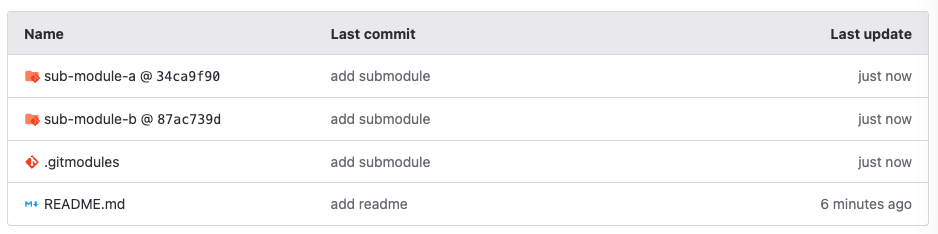
root-module repository 에 sub-module repository 2개 를 submodule 로 삽입한다.

1
2
3
4
5
6
7
8
9
10
11
cd root-module
git submodule add https://gitlab.my.company.com/test-group/sub-module-a
git submodule add https://gitlab.my.company.com/test-group/sub-module-b

cat .gitmodules
# [submodule "sub-module-a"]
# path = sub-module-a
# url = https://gitlab.my.company.com/test-group/sub-module-a
# [submodule "sub-module-b"]
# path = sub-module-b
# url = https://gitlab.my.company.com/test-group/sub-module-b

image26

각 디렉토리에는 별도의 .git 파일이 존재하고 commit 버전을 기준으로 연결시키기 때문에 별도의 pull 처리를 해줘야 버전을 따라갈 수 있다.
또한 root repository 에서 어떤 commit 버전을 사용할지도 결정해줘야 한다.

처음 서브모듈이 있는 git repository 를 git clone 하였을 때 서브모듈이 모두 비어있는 상태이다.

아래 init, update 명령을 통해 초기화 해야 한다.

1
2
3
4
5
6
git submodule init   # 서브모듈 초기화
git submodule update # 서브모듈 업데이트

# 서브모듈의 하위 서브모듈까지 모두 업데이트
git submodule update --init --recursive

subtree

subtree는 하나의 Git 저장소 내에서 다른 Git 저장소의 내용을 특정 디렉토리로 병합하는 방법.
서브트리는 상위 프로젝트의 일부로 취급되며, 하나의 통합된 Git 기록을 가진다.

1
2
3
4
5
6
7
8
9
10
11
12
13
14
15
16
17
18
19
git clone https://gitlab.my.company.com/test-group/root-tree
git clone https://gitlab.my.company.com/test-group/sub-tree-a
git clone https://gitlab.my.company.com/test-group/sub-tree-b

git subtree add --prefix=sub-tree-a https://gitlab.my.company.com/test-group/sub-tree-a main

git fetch https://gitlab.my.company.com/test-group/sub-tree-a main
# warning: redirecting to https://gitlab.my.company.com/test-group/sub-tree-a.git/
# remote: Enumerating objects: 3, done.
# remote: Counting objects: 100% (3/3), done.
# remote: Compressing objects: 100% (2/2), done.
# remote: Total 3 (delta 0), reused 0 (delta 0), pack-reused 0
# Unpacking objects: 100% (3/3), 2.79 KiB | 570.00 KiB/s, done.
# From https://gitlab.my.company.com/test-group/sub-tree-a
# * branch main -> FETCH_HEAD
# Added dir 'sub-tree-a'

ls
# README.md sub-tree-a

subtree 는 기존 git 의 history 를 보존하면서 두 repository 를 합칠 수 있다.

1
2
git log
# 두 repository 의 로그가 모두 저장되어있는지 확인

subtree 에서 변경된 내용을 pull 해올 수 있고
root 에서 subtress 의 내용을 변경하고 push 할 수 있다.

1
2
3
4
5
6
7
8
9
10
11
12
13
14
git subtree pull --prefix=sub-tree-a https://gitlab.my.company.com/test-group/sub-tree-a main

# warning: redirecting to https://gitlab.my.company.com/test-group/sub-tree-a.git/
# remote: Enumerating objects: 4, done.
# remote: Counting objects: 100% (4/4), done.
# remote: Compressing objects: 100% (2/2), done.
# remote: Total 3 (delta 0), reused 0 (delta 0), pack-reused 0
# Unpacking objects: 100% (3/3), 258 bytes | 86.00 KiB/s, done.
# From https://gitlab.my.company.com/test-group/sub-tree-a
# * branch main -> FETCH_HEAD
# Merge made by the 'ort' strategy.
# sub-tree-a/testb.txt | 0
# 1 file changed, 0 insertions(+), 0 deletions(-)
# create mode 100644 sub-tree-a/testb.txt
1
2
3
4
5
6
7
8
9
10
11
12
13
14
15
16
17
git add .
git commit -m "add test.txt at subtree"
# root main 에다 push
git push
# subtree 에다가 push
git subtree push --prefix=sub-tree-a https://gitlab.my.company.com/test-group/sub-tree-a main

git push using: https://gitlab.my.company.com/test-group/sub-tree-a main
warning: redirecting to https://gitlab.my.company.com/test-group/sub-tree-a.git/
Enumerating objects: 3, done.
Counting objects: 100% (3/3), done.
Delta compression using up to 8 threads
Compressing objects: 100% (2/2), done.
Writing objects: 100% (2/2), 260 bytes | 260.00 KiB/s, done.
Total 2 (delta 1), reused 0 (delta 0), pack-reused 0
To https://gitlab.my.company.com/test-group/sub-tree-a
373ffb7..c76ee34 c76ee34422e3dcb9ecfcbe9c60bf9f7bdb3d08cc -> main

추가 옵션

subtree로 사용할 원격 저장소 추가

1
2
3
4
5
6
7
# git remote add <원격 저장소의 이름> <원격 저장소의 주소>
git remote add demo-lib https://gitlab.my.company.com/test-group/demo-lib

# demo-lib 라는 이름으로 새로운 원격 저장소가 추가되었다.
git remote
# origin
# demo-lib

새로운 원격 저장소의 브랜치를 서브트리로 추가

1
2
# git subtree add --prefix <클론할 폴더> <원격 저장소의 이름> <브랜치 이름>
git subtree add -P src/demo-lib https://gitlab.my.company.com/test-group/demo-lib main

worktree

브런치를 이동 & stash 처리를 수행하며 작업하기 불편할 때 사용
쉽게 여러개의 branch 에 접근해서 작업을 수행가능.

1
2
3
4
5
6
7
8
# 기존의 test-branch 를 가져와 원하는 위치에 worktree 생성
git worktree add ../test-branch-path test-branch
# 새로운 test-branch 를 생성하고 원하는 위치에 worktree 생성
git worktree add -b demo-branch ../test-demo-path main
git worktree list
# /Users/kouzie/Documents/dev/test-worktree a115610 [main]
# /Users/kouzie/Documents/dev/test-branch-path a115610 [test-branch]
# /Users/kouzie/Documents/dev/test-demo-path a115610 [demo-branch]

worktree 로 생성한 프로젝트 디렉토리 내부에는 .git 디렉토리 대신 원본위치를 가리키는 .git 파일이 저장되어있다.

1
2
3
cd ../test-branch-path
cat .git
# gitdir: /Users/kouzie/Documents/dev/test-worktree/.git/worktrees/test-branch